Skip to content

Inside AMAYA

See what you can do in AMAYA.

Start with your day, a question or an observation you want to keep. Explore the explanations and examples, then open the feature in the app.

today

Check the hours before something important

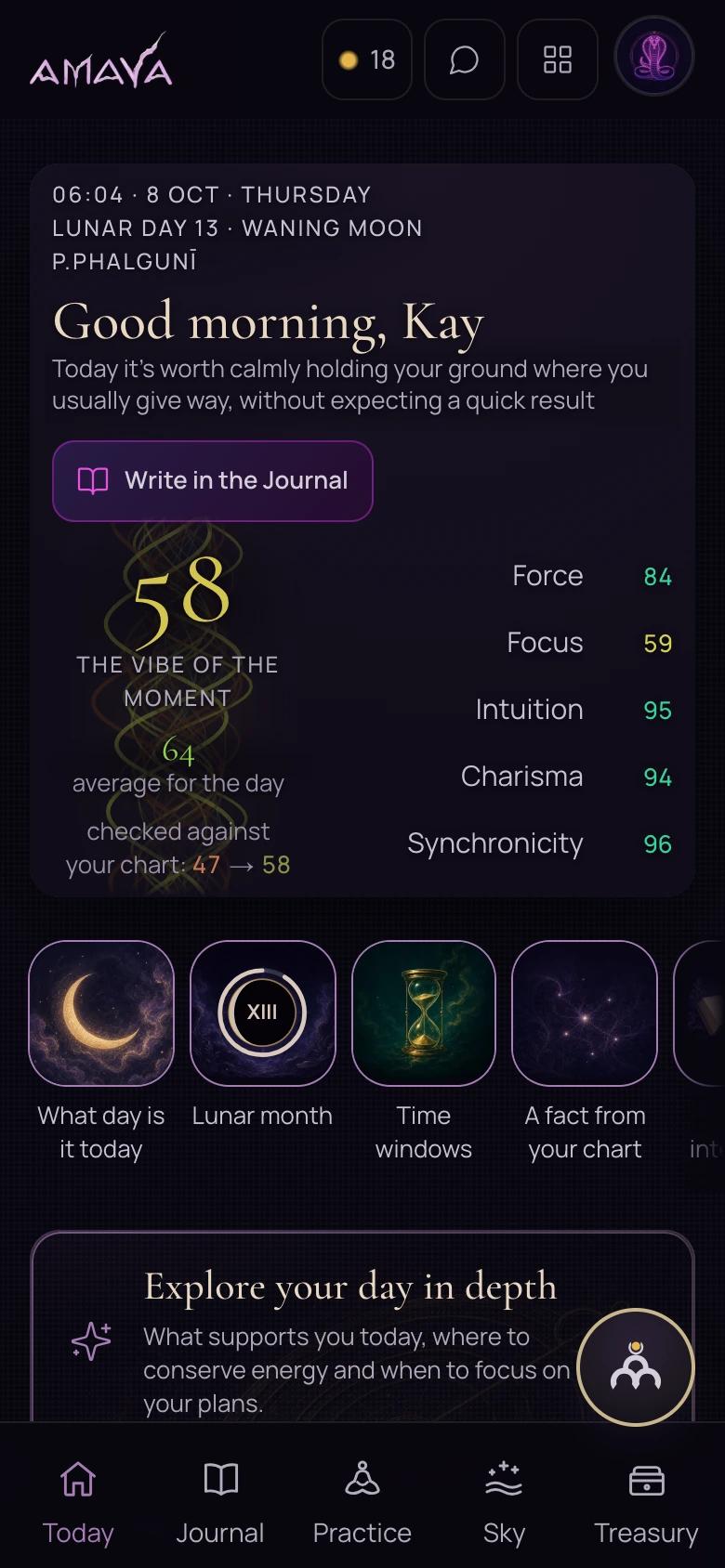
Today shows the lunar day, advice, plus favourable and difficult hours for your city. Before a meeting, you can open the schedule and read why each hour is marked as easier or more demanding.

The calculation uses your birth chart and current city. Change your city in settings when you travel.

Open Today in the app
A detail of the saved Today screen: date, advice and five indicators.
A detail of the saved Today screen.
View the complete screen

Ask the Sky and Readings

First, your question. ‘Should I take this job?’, ‘Should I agree to the move?’, ‘How can I approach a difficult conversation?’ Describe the situation in your own words.

AMAYA calculates the moment you ask. The calculation uses the Moon and planets for your city. You do not need an exact birth time for this question.

Read the answer and its explanation. See which circumstances it considers, which actions you might weigh and what period it covers. Then ask the advisor a follow-up.

Understand what you read

The Guide explains the screen. The advisor continues the conversation.

Is a chart marker unfamiliar, or do you want to discuss a situation? Choose a reference explanation or ask your own question.

Ask your own question

Guide: understand the current section

Start with the page's Guide when you want a marker explained.

What you will see
Questions about the current screen. A reference explanation expands beneath its row; sections with personal prompts may produce an answer on request.
What to do
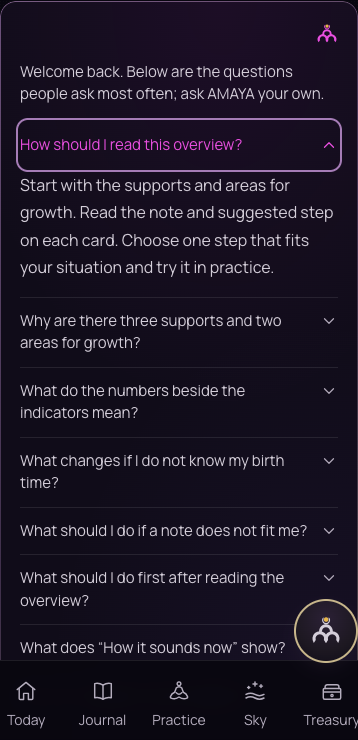
Open the question that relates to the unclear detail. In Chart Overview, for example, choose How do I read this overview?

Advisor: discuss your situation

Open a conversation with AMAYA to relate a reading to your circumstances.

What you will see
Your question field and conversation history. You can follow up on a conclusion or ask which data supports it.
What to do
Describe one matter, the options and your constraints. Then ask about a specific part of the answer.
See the Guide example in Chart OverviewExplore the advisor

Journal

Keep your experience and return to it

In the morning, you can choose time for a task. In the evening, record what happened. Journal brings entries, dreams, practices and intentions into a calendar so your observations have a history.

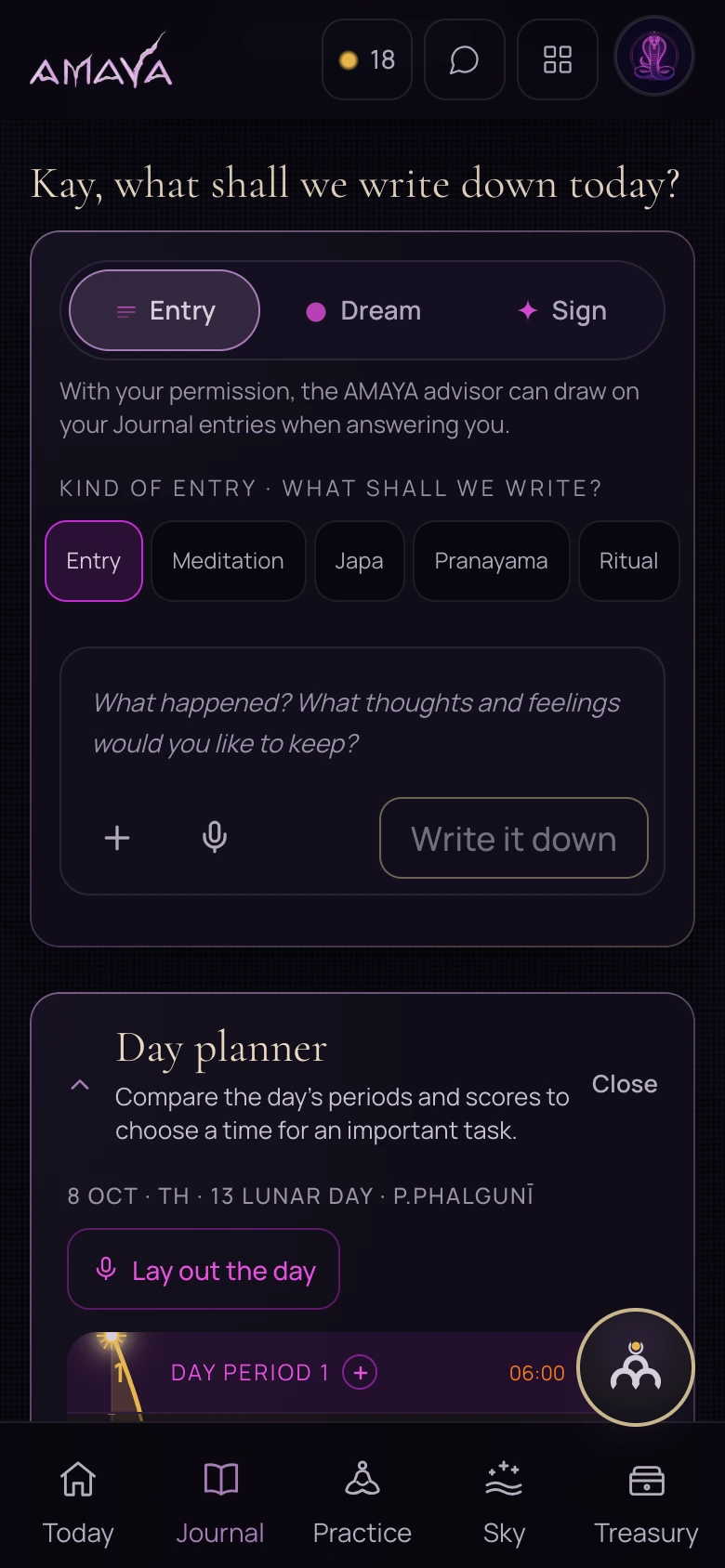
The live Journal screen on a phone.
The actual AMAYA Journal, captured on 8 October 2026. The entry field and beginning of the Day planner are visible. Dream, Archive, Muhūrta and Analytics open separately and are outside this capture.
View the original screen
An entry, dream or practice

Choose an entry type when you want to keep an event or a feeling.

What you will see
Entry, Dream and Sign tabs. An entry can be an ordinary note or a practice record with states; a dream has texture labels. Practice minutes and mālā rounds are available where relevant.
What to do
Write what happened and what you noticed. Add an image or audio attachment if needed.
Day planner: distribute tasks through the day

Open the Day planner when several tasks compete for the same morning.

What you will see
Periods of the chosen day with scores and hours alongside them. You can change the date and ask the advisor through Distribute tasks.
What to do
Compare the periods with your tasks and practical constraints. Ask why a particular hour has that marker.
Muhūrta: examine time for a task

Use Muhūrta to consider timing for a specific kind of action.

What you will see
A task selector and calendar with favourable and difficult dates. Location and available personal details inform the calculation.
What to do
Choose the task, check the location and read the explanation for a date before setting a time.
Archive: read a past day again

Open Archive when you want to return to a dream or a past practice.

What you will see
A monthly calendar and entry labels. Select a day or filter entries by type and other saved marks.
What to do
Choose a date or label and read the entry in its original context.
Analytics: notice your own rhythm

After several entries, look at when and what you record.

What you will see
Entry counts, days with entries and practice minutes when present. Below are distributions by parts of the day, lunar days, practice types, dreams and signs.
What to do
Compare observations from different days. A distribution can help you form a question; it does not explain an event's cause on its own.
Intentions: keep a question in view

Save an intention for something you want to return to.

What you will see
Active intentions appear before the entry field. In the Sign tab, choose which intention an observation relates to or leave it unlinked.
What to do
Write your intention and record specific observations alongside it. Return to them through Journal.
Open Journal

your birth details

Your chart, with a way into its meaning

Start with Chart Overview. Here you can enter your birth details and see the calculation available for their precision. Open the Guide when a word or detail needs an explanation. My Chart leads to the detailed chart in Sky, subject to your access.

If your birth time is uncertain or its precision is not specified, the Overview first shows reference positions and asks you to clarify the details. A personal reading requires precise birth details.

Birthplace and your current city

The birthplace belongs to your birth details. Your current city is used for the day you are viewing. They answer different questions, so check each in its own context.

Open Chart Overview
The chart overview Guide: prepared questions and an explanation of how to read the overview.
The Guide inside Chart Overview, with an explanation open. Captured on 8 October 2026.
  1. Add the details

    Date, place and the birth time you know. Choose the appropriate level of precision.

  2. Explore the calculation

    See which details are available at the current level of precision. Begin with one explanation.

  3. Open the explanation

    Use the Guide, then explore My Chart when you want to see the underlying detail.

Ask the sky

A decision, a conversation, a dispute or stalled negotiations. Compare the methods and explore each chart. For your own question, enter your city; an exact birth time is not required.

Svara · Tājika-horā

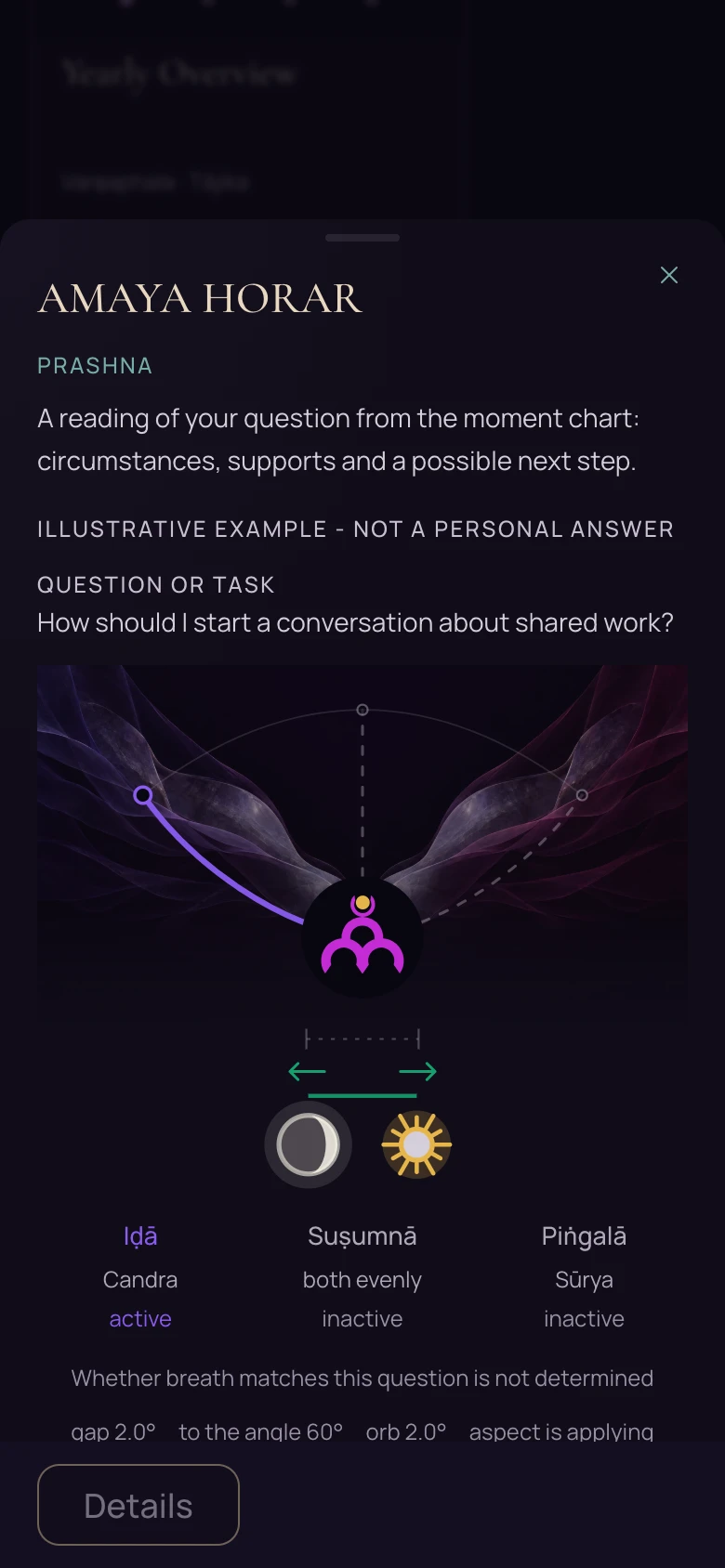
AMAYA HORAR

A decision that is coming due

Sample chart: Svara · Tājika-horā
Preview of the HORAR exampleFull example

In the full example, you can see which markers are moving closer and which breathing side is selected.

Question, inputs and next step
When to use this method
Horary helps you examine a decision that is coming due. For example: ‘Should I sign this office lease?’ Two ways of reading the same chart show whether their conclusions agree. The answer covers today through the coming weeks.
The question in this example
How should I start a conversation about shared work?
What you enter
Describe the situation and your question in your own words.
Next step
Open the app and ask your question.

Candra-Kālānala

A clear answer to one question

A decision for the coming days

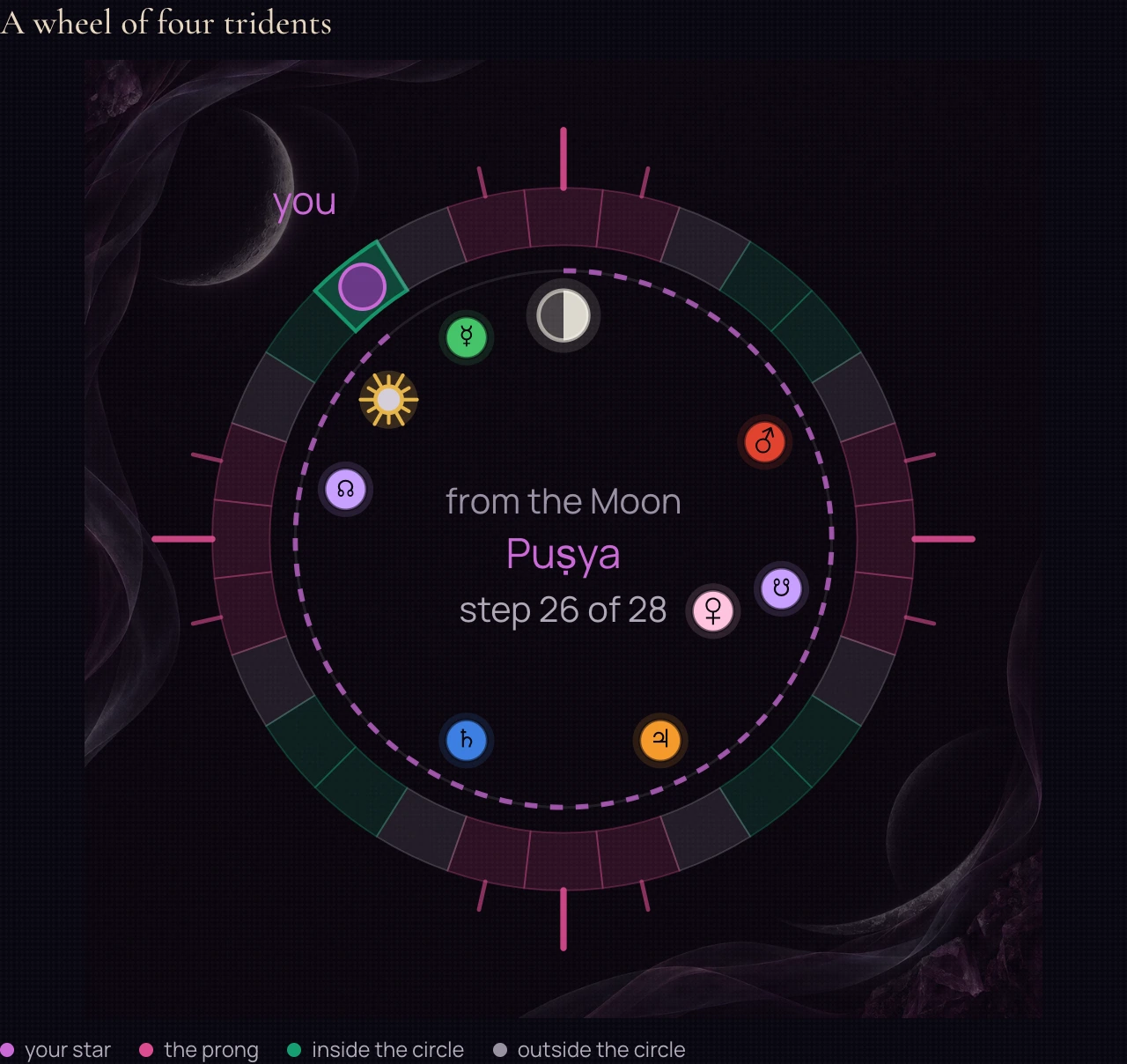
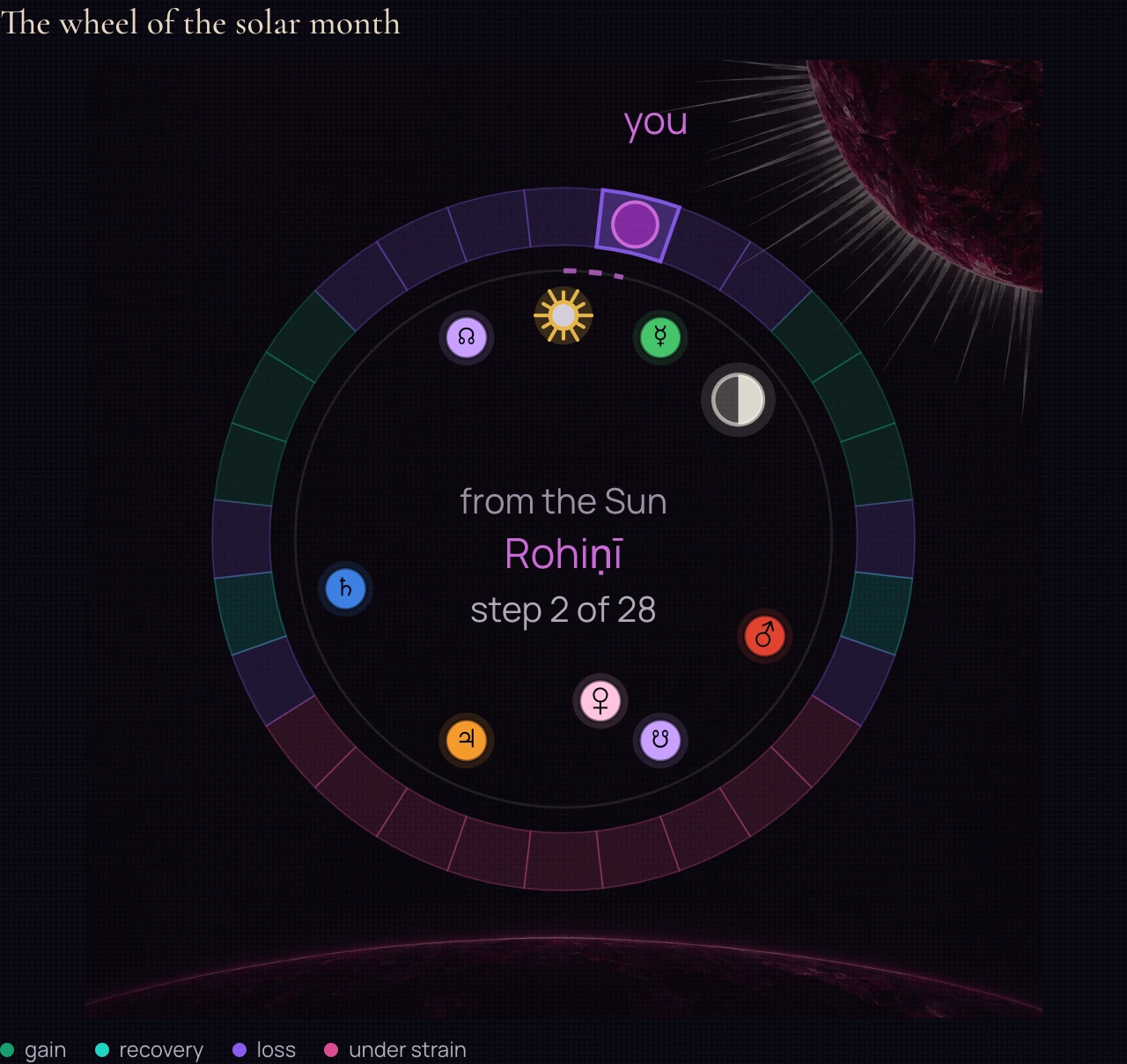
Sample chart: Candra-Kālānala
Sample chart from the appFull example

The sample wheel shows its zones, planet markers and the step from the Moon's star to the selected star.

Question, inputs and next step
When to use this method
Candra-Kālānala offers a short view of the next three days. It suits a question that matters now: making a call, sending a message or attending a meeting. It offers a quick reading.
A question to explore
Should I start an important conversation today?
What you enter
Your question in your own words and the city used for the moment of the question.
Next step
Open Ask the Sky in Practice and choose a method for your situation.

Sūrya-Kālānala

Footing in a dispute and in talks

A situation involving another side

Sample chart: Sūrya-Kālānala
Sample chart from the appFull example

The sample wheel shows coloured zones and the marked step from the Sun's star.

Question, inputs and next step
When to use this method
Sūrya-Kālānala considers situations with another side: a dispute, negotiation or competition. It reads the balance of the situation over roughly thirteen days. For example: ‘How can I approach this dispute with my contractor?’
A question to explore
How can I approach a dispute with my contractor?
What you enter
Your question in your own words and the city used for the moment of the question.
Next step
Open Ask the Sky in Practice and choose a method for your situation.

Kāla-cakra

Crisis Analysis

Talks have stalled

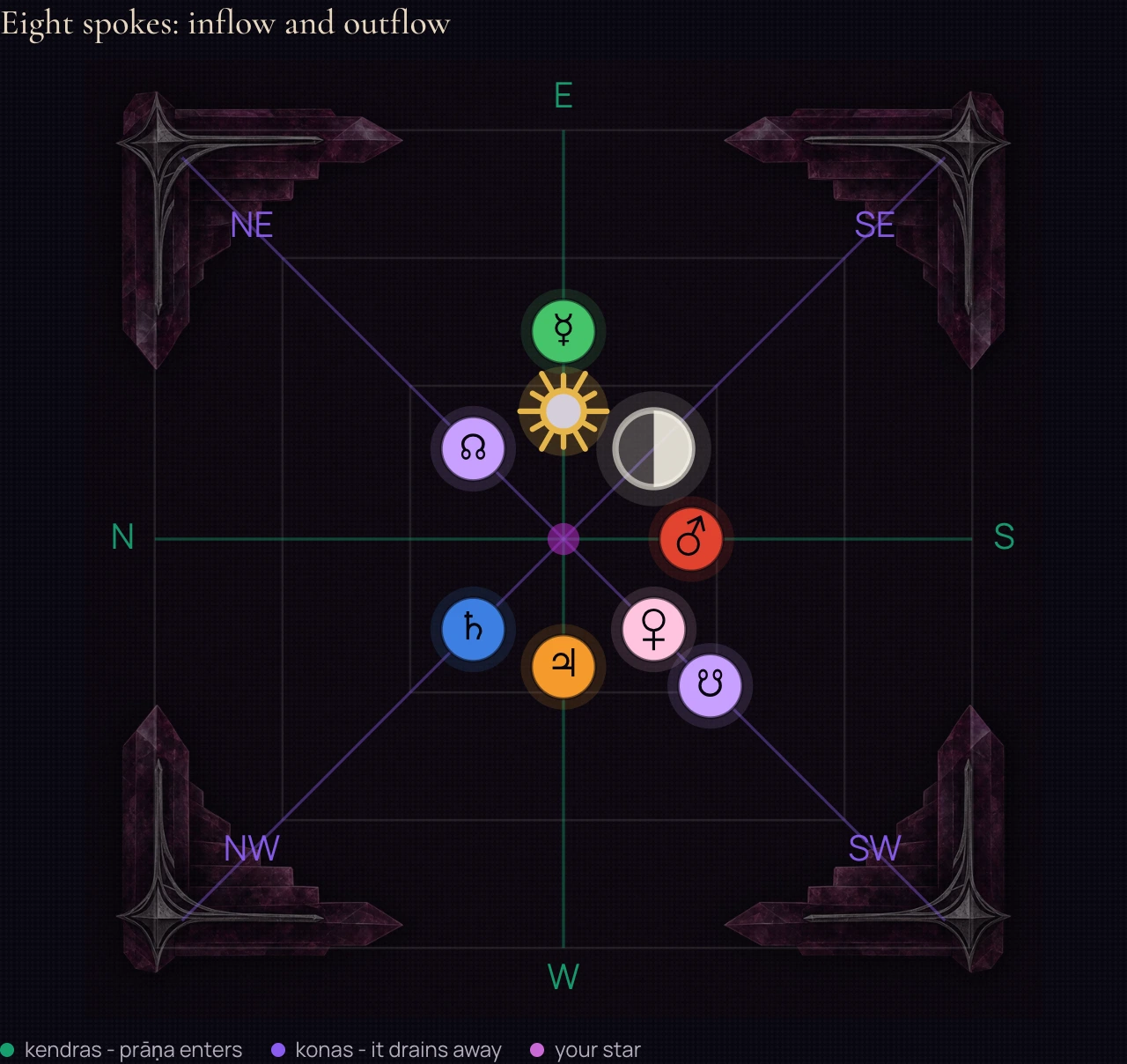
Sample chart: Kāla-cakra
Sample chart from the appFull example

The sample chart shows three nested squares, eight directions and planet markers.

Question, inputs and next step
When to use this method
When talks have stalled, use Crisis situation analysis. It examines the circumstances and possible actions over the coming week. It cannot promise that any one step will work.
A question to explore
What should I consider when talks have stalled?
What you enter
Your question in your own words and the city used for the moment of the question.
Next step
Open Ask the Sky in Practice and choose a method for your situation.

Readings

From conversations and travel to long-term demands and planning a year. Explore the charts, compare their uses and open each example at full size.

Śani-cakra

Long-term demands

How should I spread a long workload?

Sample chart: Long-term demands. The figure has nine zones. Two markers connect the birth position with the current one: first check whether the zones overlap, then read each explanation. This sample marks two different zones.
Sample chart from the appFull example

The figure has nine zones. Two markers connect the birth position with the current one: first check whether the zones overlap, then read each explanation. This sample marks two different zones.

Inputs and next step
Example inputs
Sample current and reference markers.
What to try in the app
In the app, compare your reference and current zones; read the next change date only when it is available.

Śūla-cakra

A disputed decision and a new task

How should I approach a disputed decision?

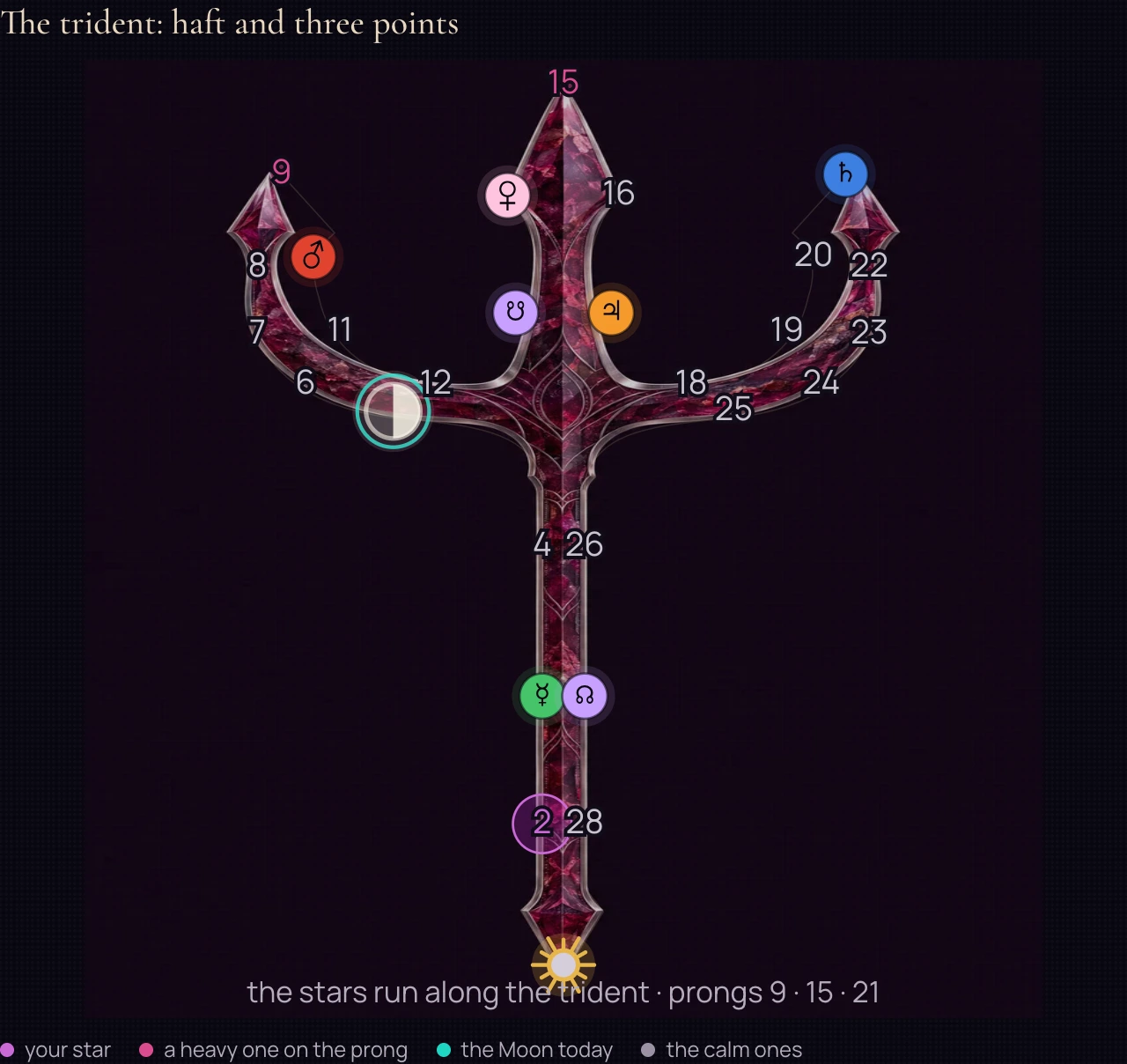
Sample chart: A disputed decision and a new task. The trident separates its haft from three points. The marker for the chosen moment falls in one of these sections. Their differences help frame a specific question about starting a task rather than treating the whole diagram as one sign.
Sample chart from the appFull example

The trident separates its haft from three points. The marker for the chosen moment falls in one of these sections. Their differences help frame a specific question about starting a task rather than treating the whole diagram as one sign.

Inputs and next step
Example inputs
Sample Sun and Moon positions and a reference marker.
What to try in the app
For your reading, enter the chosen starting moment and read the trident section alongside its explanation.

Sarvatobhadra-cakra

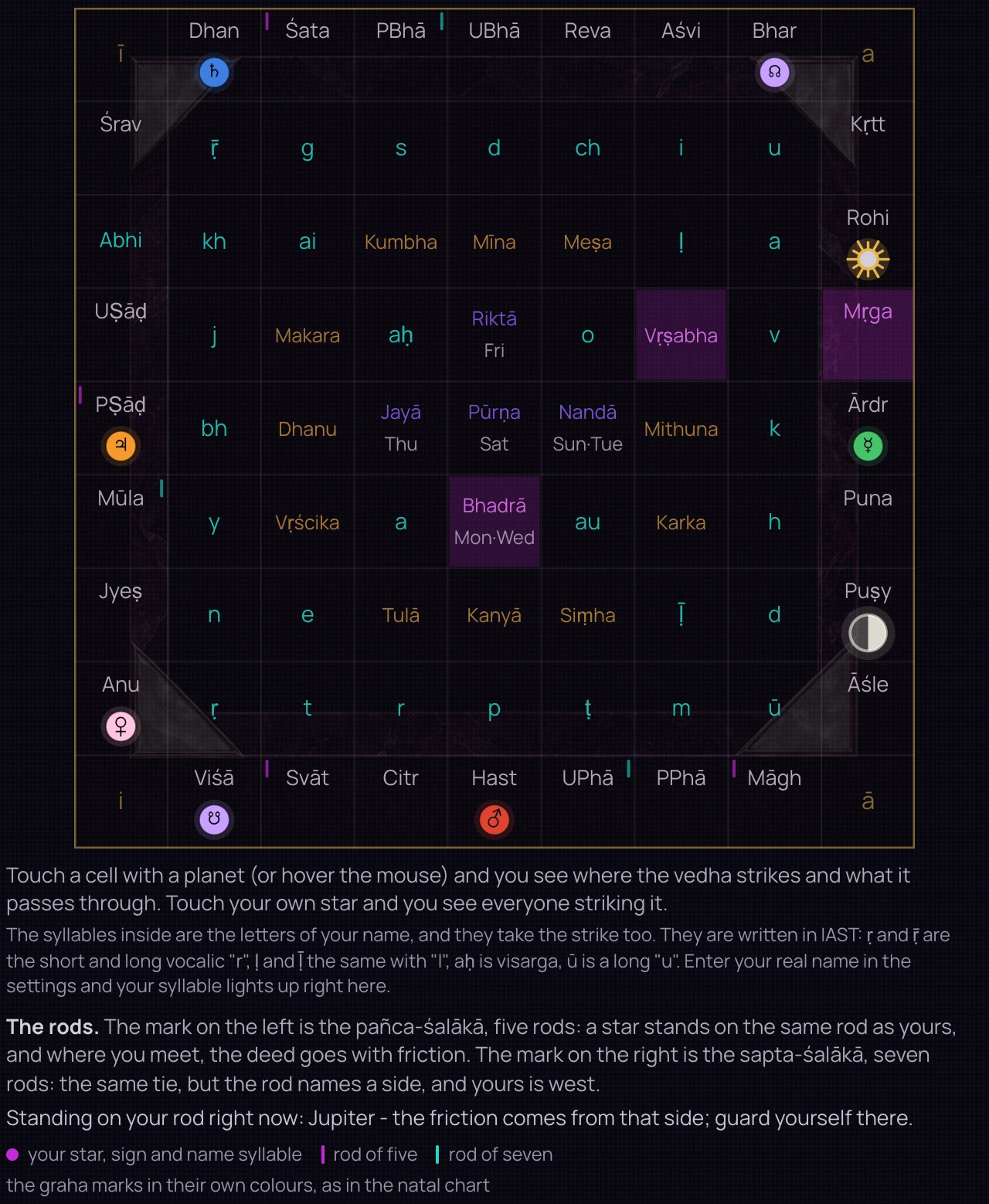
Conversations and intersections

Where should I start a difficult conversation?

Sample chart: Conversations and intersections. The grid connects stars, letters and other supports of the day. Lines between cells show intersections considered in the reading. Start with a marked cell and follow the line to its intersection.
Sample chart from the appFull example

The grid connects stars, letters and other supports of the day. Lines between cells show intersections considered in the reading. Start with a marked cell and follow the line to its intersection.

Inputs and next step
Example inputs
Sample marker positions in the grid.
What to try in the app
Check the available supports in your chart and the marked intersections. The explanation states which inputs were considered.

Koṭa-cakra

Pressure and capacity

What needs protection now?

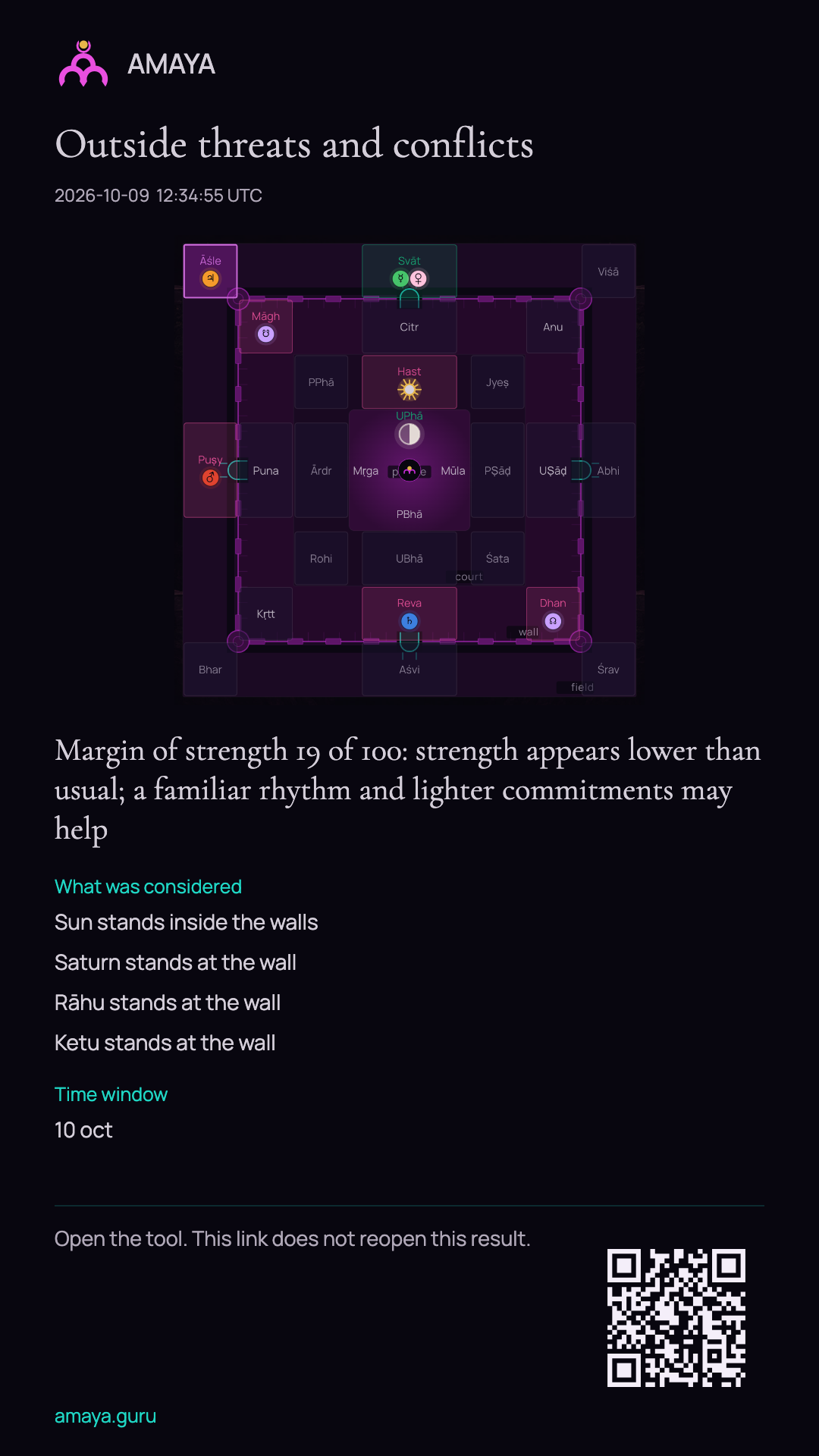
Example Outside threats and conflicts reading: fortress chart and the beginning of the conclusion. The link opens the complete result.
Preview of the saved cardFull example

The fortress has a core, inner ring, wall and outer field. Compare markers at the boundary and inside: the chart distinguishes outside pressure from inner stability. The saved card shows this example’s conclusion below.

Inputs and next step
Example inputs
Demonstration inputs from the saved reading.
What to try in the app
Describe where the pressure comes from and what supports you, then read the factors behind the reading as well as its conclusion.
Inside the complete card
The fortress shows markers inside its walls and along its boundaries. The conclusion turns the calculation into a suggestion about your workload. The complete card includes the factors considered and the period covered by the reading.

Kūrma-cakra

Places and directions

How can I compare places to work?

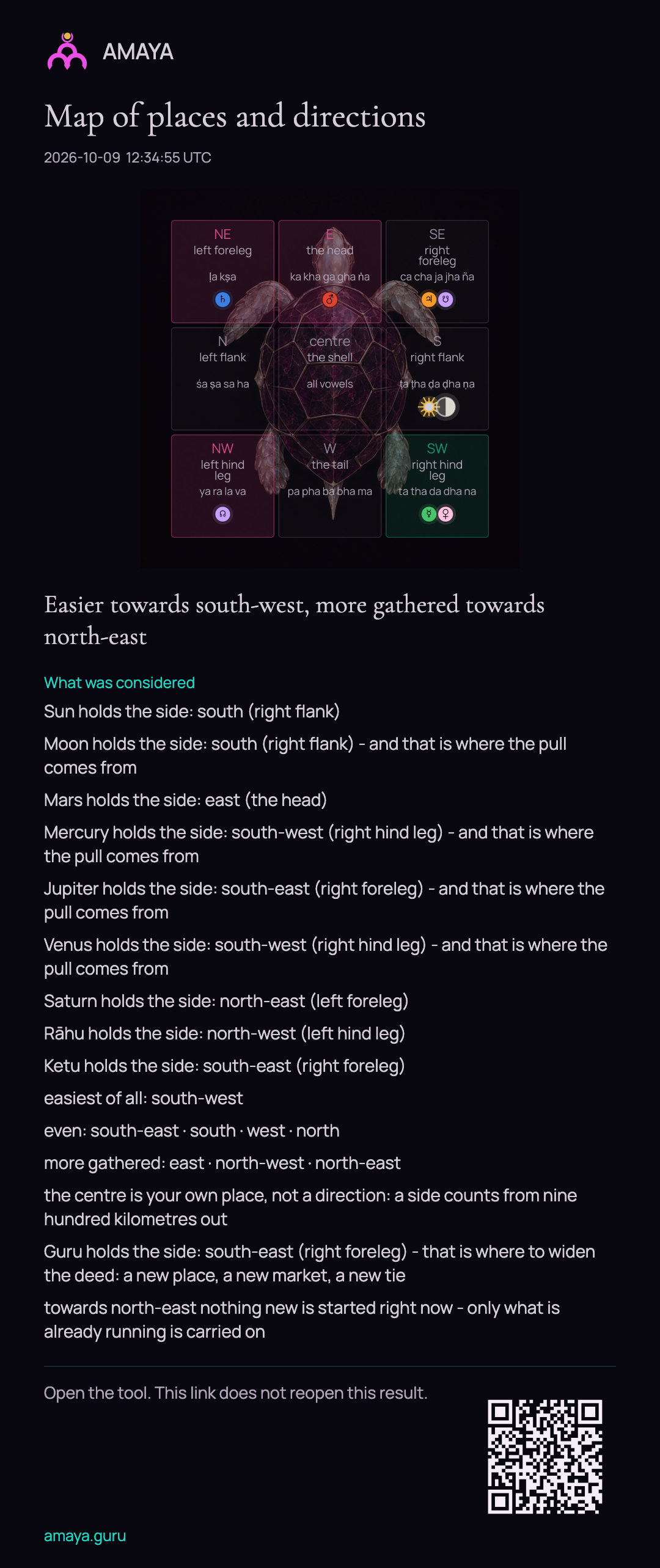
Example Map of places and directions: tortoise grid, planet markers and the beginning of the conclusion. The link opens the complete result.
Preview of the saved cardFull example

The tortoise has nine regions: the centre and eight compass directions. Find a direction and its associated markers. The complete card keeps the conclusion and the positions that informed it.

Inputs and next step
Example inputs
Demonstration inputs from the saved reading.
What to try in the app
Open a compass direction from your current location and compare its reading with another direction.
Inside the complete card
The grid connects each marker to a direction. A short conclusion sits below the chart for the selected moment. The complete card lists the positions used in the calculation.

Ḍimbha-cakra

The first step of a project

My project is underway. What should I consider next?

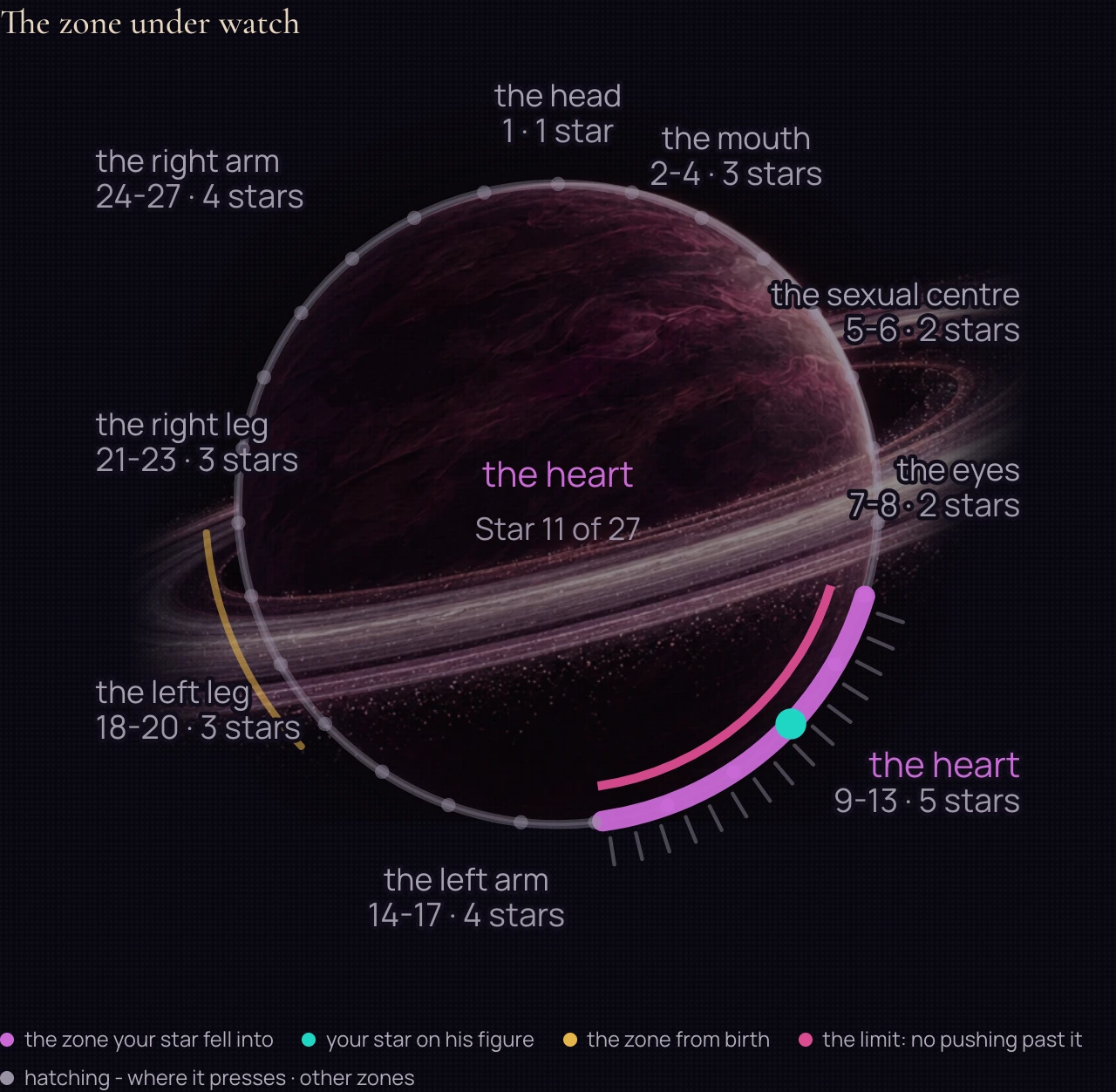
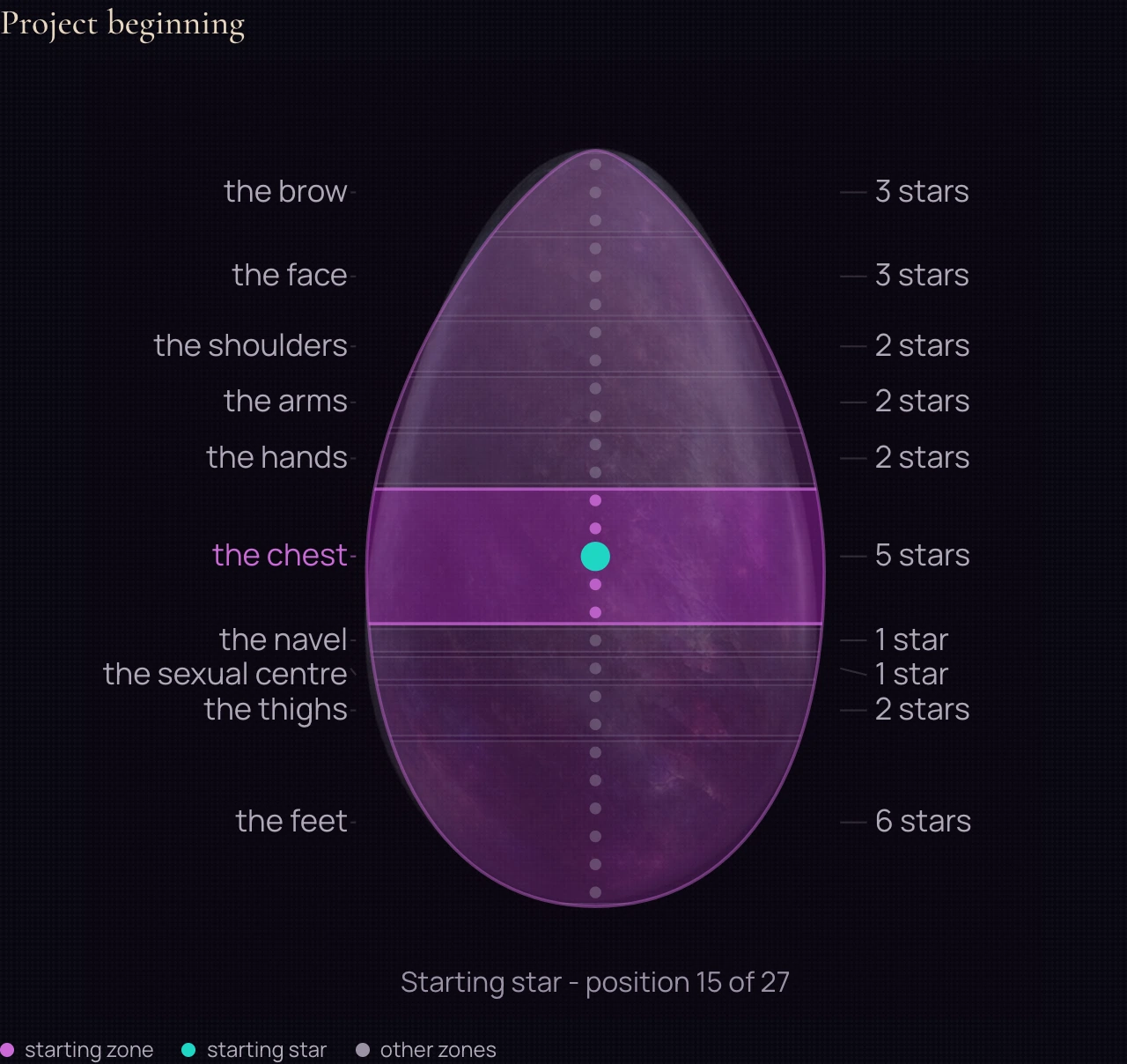
Sample chart: The first step of a project. Stars run along the figure from brow to feet. For a project’s beginning, the chart places the Moon against this reference. The sample marks one section of the figure; its explanation helps frame what to clarify in the project plan.
Sample chart from the appFull example

Stars run along the figure from brow to feet. For a project’s beginning, the chart places the Moon against this reference. The sample marks one section of the figure; its explanation helps frame what to clarify in the project plan.

Inputs and next step
Example inputs
A sample section for starting a project.
What to try in the app
Enter the starting date of an existing project and relate the explanation to the questions the project faces now.

AMAYA Year Chart

Planning a year

How should I set priorities for the year?

Sample chart: Planning a year. The year chart shows celestial positions for the chosen year and place. This is the chart overview, not every period and conclusion of the yearly reading. In the app, start with the year overview and choose a topic to read more closely.
Sample chart from the appFull example

The year chart shows celestial positions for the chosen year and place. This is the chart overview, not every period and conclusion of the yearly reading. In the app, start with the year overview and choose a topic to read more closely.

Inputs and next step
Example inputs
A sample chart for 2026, coordinates 55.75 / 37.6.
What to try in the app
Choose a year and read its main theme. Then compare it with the periods of the year and the themes highlighted in the reading.

Find a question like yours

‘Should I take this job or wait?’

Horary explores entering a situation, with a horizon from today to the coming weeks.

‘Should I move to another city?’

A short reading considers the next few days. The Locations and Directions Chart offers a wider view of the places involved.

‘How can I approach this dispute with my partner?’

Sūrya-Kālānala considers the balance of the situation over roughly thirteen days.

‘Which date should I choose for signing the contract?’

The Day and Date Reading considers the date. It is free and does not require a written question.

‘My partner has barely been in touch for three weeks. How can I approach this?’

Crisis situation analysis explores the options that remain, about a week ahead.

‘Should I start my project now or wait?’

Horary considers entering the situation, while the Beginnings Chart reads a project from the moment it started.

‘Should I travel for work on Monday or Thursday?’

Candra-Kālānala offers a short reading for the next three days.

‘When could I bring up a raise with my manager?’

A personal question and the favourable and difficult hours on Today can offer perspectives on the conversation and its timing.

Question, calculation, reading
  1. 01

    First, your question. ‘Should I take this job?’, ‘Should I agree to the move?’, ‘How can I approach a difficult conversation?’ Describe the situation in your own words.

  2. 02

    AMAYA calculates the moment you ask. The calculation uses the Moon and planets for your city. You do not need an exact birth time for this question.

  3. 03

    Read the answer and its explanation. See which circumstances it considers, which actions you might weigh and what period it covers. Then ask the advisor a follow-up.

What the reading contains

Your situation and the period the reading covers. In plain language: what is happening, what may be worth considering and how far ahead the reading looks - three days, a week, thirteen days or several weeks.

An explanation of how the reading was reached. What in the sky chart supports it, what strengthens the situation and what may complicate it. You can disagree and ask a follow-up in your own words.

Three ways to continue below the answer. Ask why the reading points that way, when to return to the question, or what could be useful today. The conversation can go deeper from there.

The question and answer stay together in your Journal. You can return later to see what you asked and what happened. You can reopen and reread a saved answer without a new calculation.

More about the readings

The AMAYA Annual Reading brings your personal year into one view. The solar return chart, yearly periods and three circles help you explore the themes of the selected year. The Reading is available with INNER and requires your birth date, exact birth time and birthplace.

The Day and Date Reading considers a date that matters to you. A meeting, a wedding, a move or an important conversation. The scheme dates to 1232 and was used to choose the beginning of a campaign. This Reading is free.

The External Pressures Reading considers the resilience of a situation. A model score from zero to one hundred describes where support or caution may be needed over a period. It offers a perspective on sustained pressure or a dispute.

The Trident Chart marks periods that call for caution around travel and new beginnings. It gives the reading a time horizon so you can consider the date of a journey or the start of a project.

The Locations and Directions Chart considers places in relation to you. It can be explored alongside plans to move, work in another city or travel. The scheme comes from Varāhamihira’s Bṛhat Saṃhitā. This Reading is free.

The Saturn Chart looks at themes that ask for sustained attention. Work, money, relationships or a project: it describes periods and their boundaries so you can consider the longer view.

The Beginnings Chart reads the moment something started. A company’s registration, a project’s first message or an agreement can become the starting point for exploring its course.
See the cost before you act. Some questions and Readings use PRANA, AMAYA's internal currency. The price appears beside the action.

Two Readings are free: Day and Date, and Locations and Directions. The personal Day and Date Reading needs your birth details. The Locations and Directions Chart works without them. No bank card is required.

What is the answer based on?

‘What is the answer based on?’ AMAYA’s own software calculates the sky for the moment of the question. The chosen traditional scheme provides the reading method, and the advisor explains it in relation to your situation.

I don’t know my exact birth time

‘I don’t know my exact birth time. Can I still start?’ Yes. Ask the Sky uses the moment of the question. A precise birth time can add detail to your personal chart and the five strengths of the day later.

How long does a reading take?

‘How long does a reading take?’ Usually a few minutes. You can ask directly in the app, without booking an appointment.

Does this replace a lawyer or a doctor?

‘Does this replace a lawyer or a doctor?’ No. AMAYA does not diagnose or provide legal opinions. Questions about health and legal matters belong with qualified professionals.

What if the reading doesn’t feel right?

‘What if I disagree with the reading?’ Ask a follow-up and read the explanation. The answer has a stated period, so you can later compare it with what happened. The decision stays yours.

Sky Studio

From one day to your own chart

A meeting tomorrow, plans for a month and questions about your birth chart call for different views. Sky includes Diagrams, My chart, Chart index and Live Sky. Choose the section that fits your question.

  1. Day: examine a chosen moment

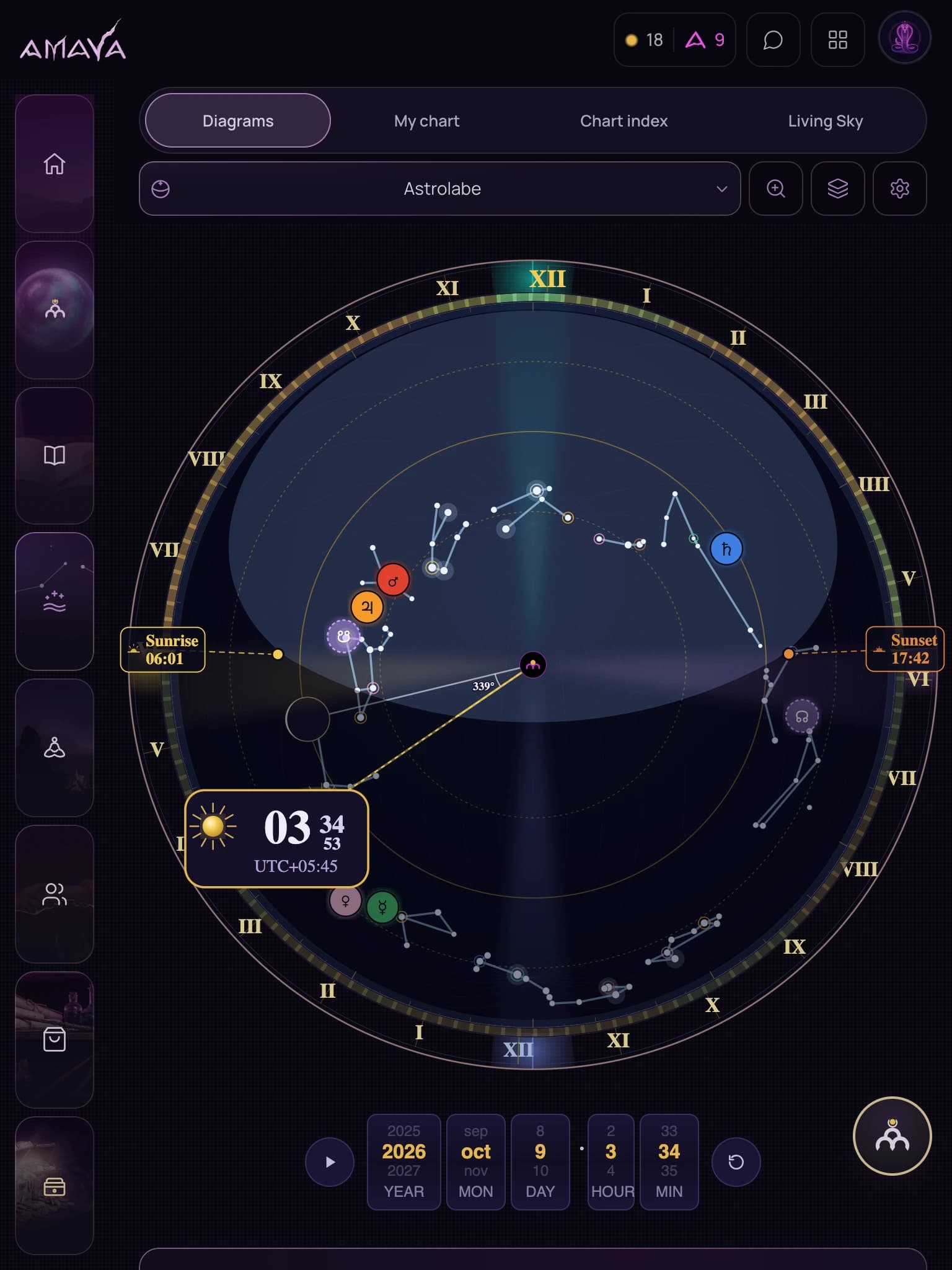
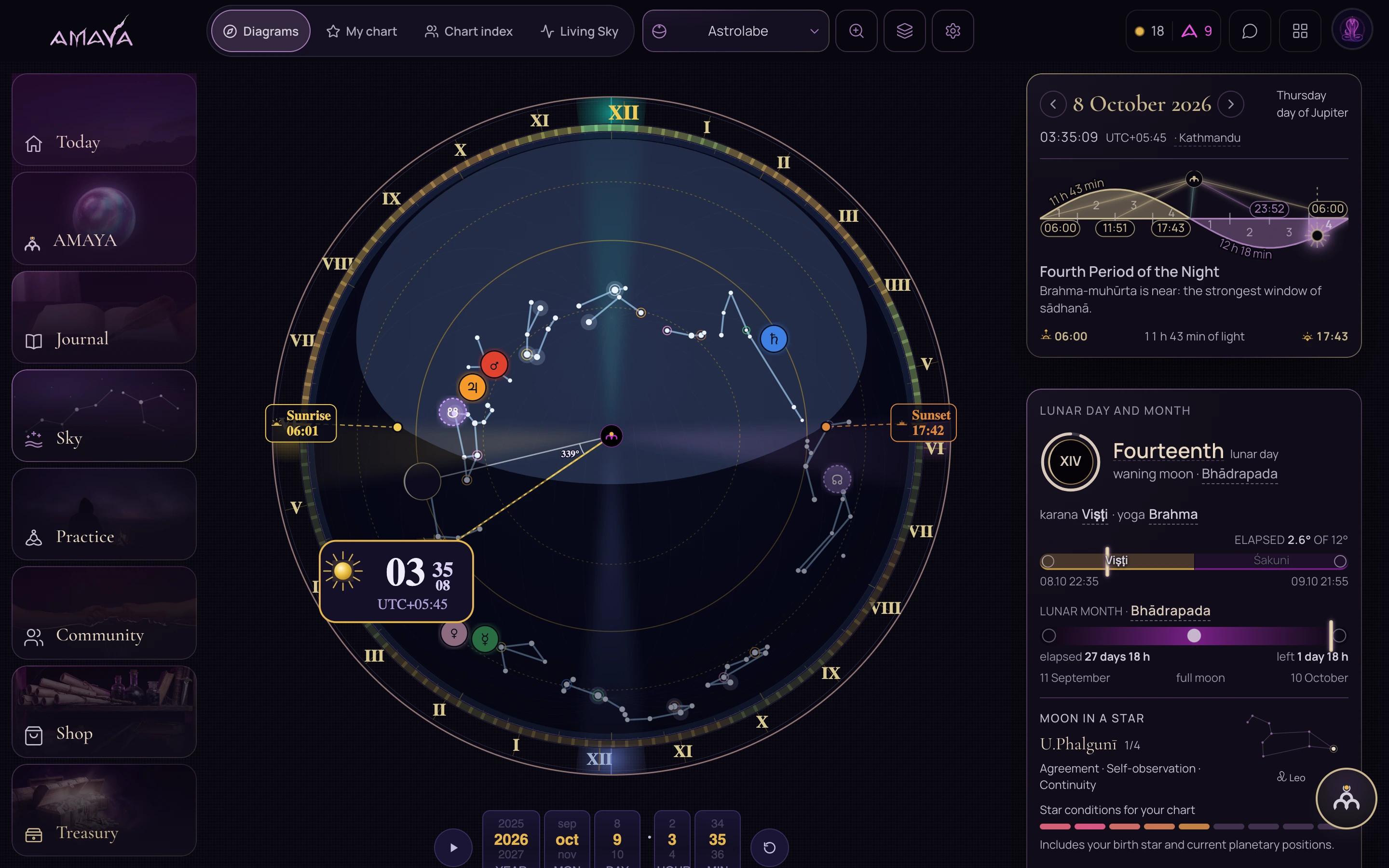
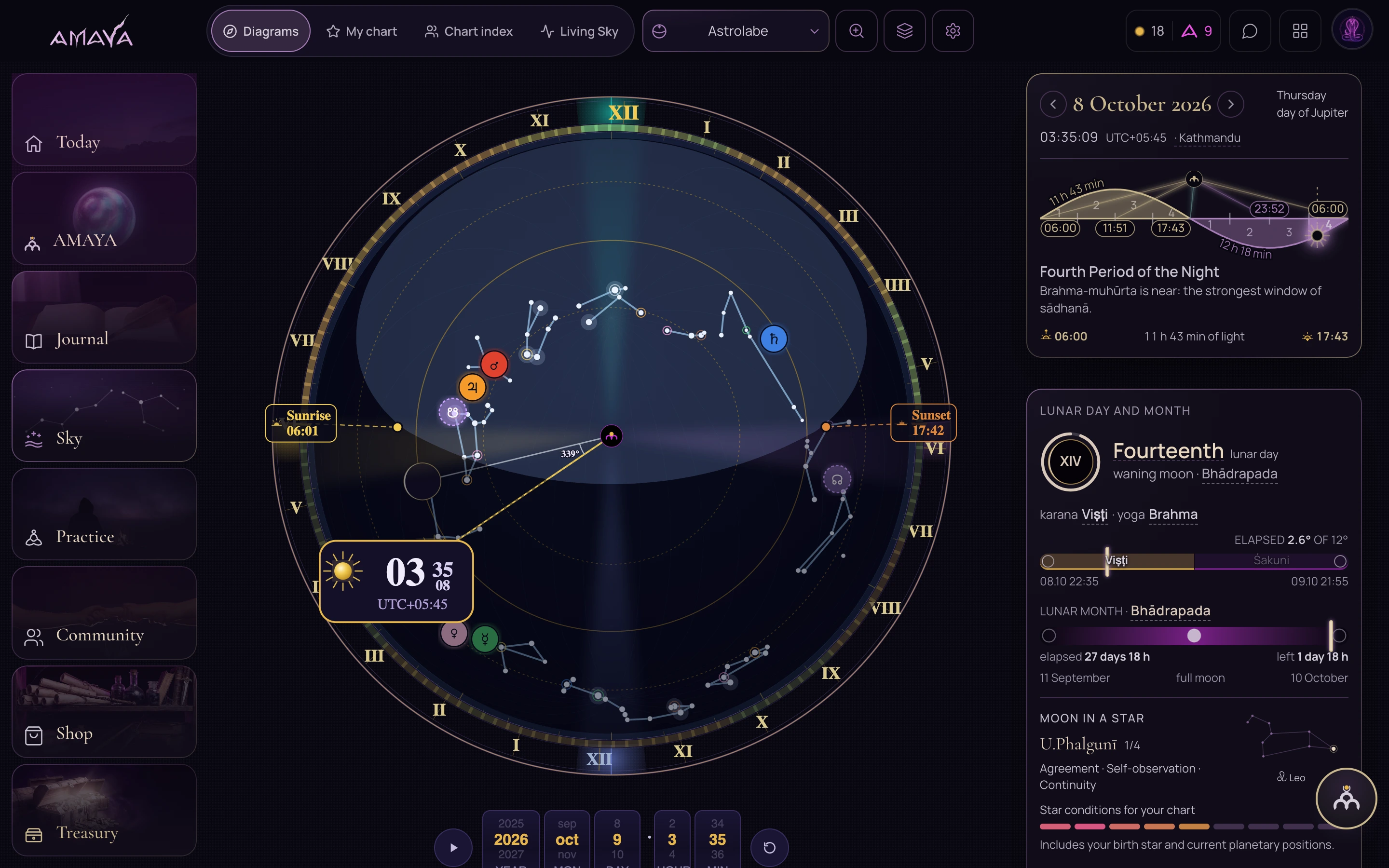
    Start with Astrolabe when you want to see the Sun, Moon and planets at a particular moment.

    What you will see
    The sky circle, celestial markers, sunrise and sunset. You can change the date and time; layers, zoom and diagram settings are available alongside it.
    What to do
    Choose the location, date and time. Examine the marker you want to understand.
  2. Month: see a broader rhythm

    Open Month in the same diagram menu when one day is too narrow a view.

    What you will see
    A month wheel replaces the day circle. This view lets you examine the whole month and its markers.
    What to do
    Choose Month and the date you need, then read the labels on the wheel.
  3. Year: look at the full cycle

    Choose Year to look at the seasonal cycle.

    What you will see
    The Studio's year wheel, available in the same menu without leaving Sky.
    What to do
    Switch the diagram to Year and choose the year you want to examine.

Several ways to view the same positions

In the day view, you can change the diagram's shape. Choose the layout you find easiest to read. Open an explanation below.

Astrolabe

A sky circle with celestial positions and the local horizon. Start here to relate the chosen moment to sunrise and sunset.

Gleason

A circular projection of the same moment. Select it in the diagram menu to inspect the positions in another layout.

West

A circular chart divided into sectors. Open it if you are familiar with this arrangement of markers.

North

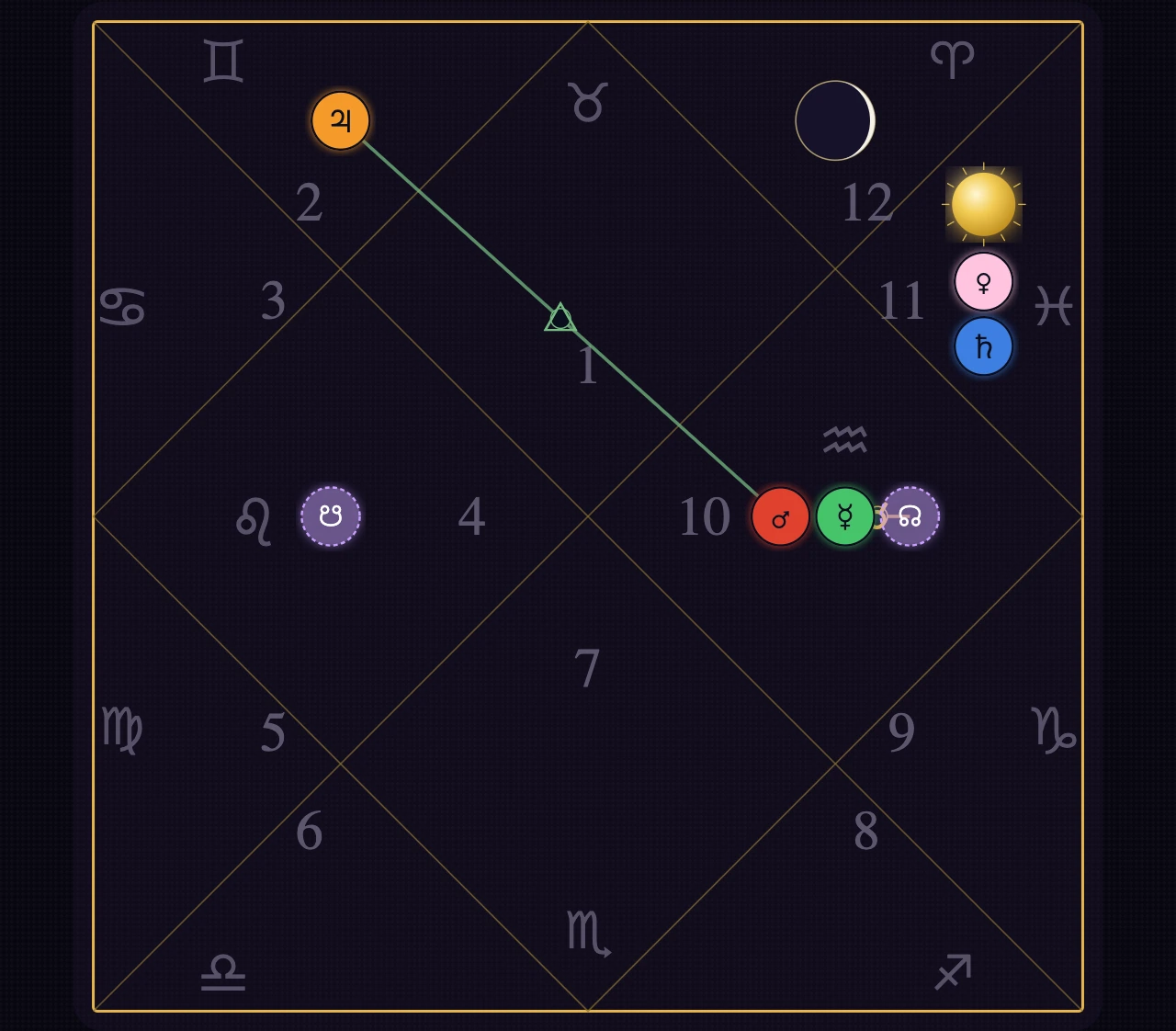
A diagram with diamonds inside a square. Choose it when separate areas make the positions easier to read.

South

A square diagram with areas around its edges. Change the view and follow where the same markers appear.

My chart: start with birth details

Open My chart and enter birth details to explore personal context.

What you will see
Birth date, time and location, a diagram and explanations. The details include positions, strength and periods; when the birth details are precise enough, Chart Overview brings together supports and areas for growth with a suggested step.
What to do
Check your source details. If the time is unknown or approximate, read the precision notice: a reference moment does not establish the full birth chart.
Chart index: return to a saved chart

The Chart index helps you find charts again when you work with several.

What you will see
Saved charts with labels and groups. A new chart has fields for birth details; a selected chart opens in the same panel.
What to do
Add a chart, give it a clear label and an optional group. Open it from the list when you return.
Live Sky: see conditions around you

Check local weather before heading out. Open Field, Sun and Earth for broader context.

What you will see
Weather, magnetic activity, flares, solar wind and nearby earthquakes. History shows charts and marks for the dates and types of your entries when available.
What to do
Check the location and each indicator's unit. Choose a period and measurement in History. Missing data leaves a value unknown rather than turning it into zero.

the sky

Explore the day, month, year and your birth chart

The chart shows the positions of celestial bodies. Below are separate weather and Sun and Earth indicator examples.

The whole sky as living diagrams: the arc of the day from sunrise to sunrise, the lunar month, the year, and your natal chart drawn in full.

Every number continues into a conversation instead of stopping at a tooltip. You touch a planet and you can ask about it.

The live Today screen on a phone.

Today, close at hand

Sky on your screen

The Sun, Moon and planets on the sky chart.

The actual AMAYA Sky screen on a phone, captured on 8 October 2026.
The actual AMAYA Sky screen on a tablet, captured on 8 October 2026.
The actual AMAYA Sky screen on a computer, captured on 8 October 2026.

How to read Live Sky

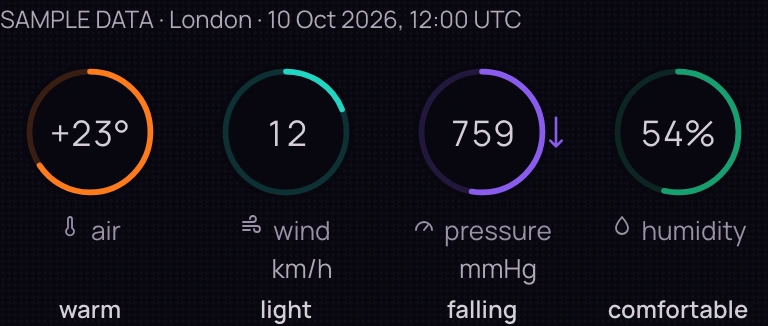
Before heading out, check the weather for your city. For broader context, open the indicators for the magnetic field, the Sun and the Earth. Each gauge has a label: its value, unit and state explain what is shown.

A quick glance alongside your day

When it helps

What should I check before leaving home?

A quick glance alongside your day

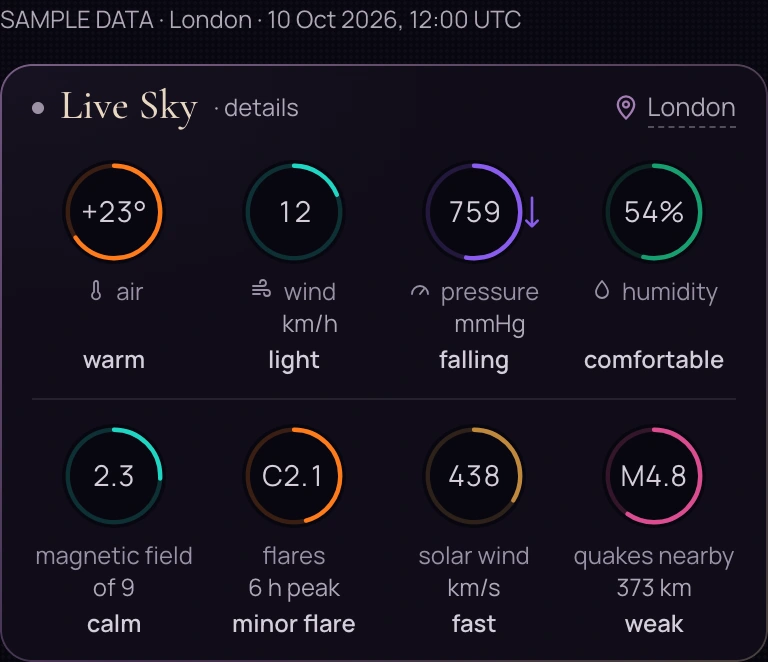
An AMAYA interface example: London, 10 October 2026, 12:00 UTC. All values are sample data chosen to illustrate the display.

Open original
Context
The compact strip puts the selected location above the weather. Field, Sun and Earth indicators appear separately below.
How to read it
Read the indicator name and unit first, then the value and state label. The ring places that indicator on its own scale.
Next step
Open the detailed Live Sky view in the app to inspect the indicators at a larger size.
Location and data availability

The selected location determines local weather and which nearby earthquakes are included. Field and solar indicators come from a shared snapshot. When an indicator is unavailable, the strip shows whether data is pending or missing.

Weather at the selected location

When it helps

How strong is the wind, and how is pressure changing?

Weather at the selected location

An AMAYA interface example: London, 10 October 2026, 12:00 UTC. All values are sample data chosen to illustrate the display.

Open original
Context
Temperature, wind, pressure and humidity refer to the selected coordinates.
How to read it
Temperature is in degrees Celsius, wind in km/h, pressure in mmHg and humidity in percent. The pressure arrow shows the direction of change; each ring uses its own scale.
Next step
In the app, check the selected location and read the labels beneath the gauges before planning time outdoors.
Location and data availability

Changing location changes the local weather request. If a value is unavailable, its gauge has a missing-data label. An empty gauge does not mean zero temperature, wind or pressure.

Field, Sun and Earth

When it helps

What do the gauges beneath the weather mean?

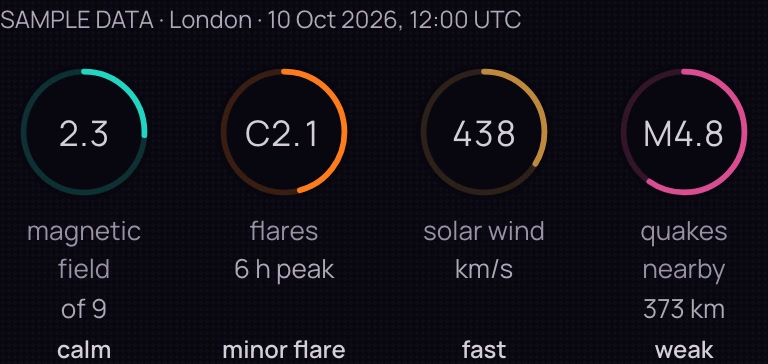
Field, Sun and Earth

An AMAYA interface example: London, 10 October 2026, 12:00 UTC. All values are sample data chosen to illustrate the display.

Open original
Context
These are separate indicators: magnetic field, solar flares, solar wind and earthquakes near the selected location.
How to read it
Kp uses a scale from 0 to 9; flares have a class label, and solar wind is in km/s. An earthquake shows magnitude M and distance. Solar wind in km/s and local wind in km/h describe different phenomena.
Next step
Open the full Sky page and read each indicator's state separately.
Location and data availability

Field and Sun indicators are shared across the snapshot. Location changes which earthquakes are included within 1,500 km. A calm label means no earthquakes were found in that selection; no data means the indicator is unavailable. These are different states.

Live Sky shows conditions around you. A personal question reading is available separately in Ask the Sky; these indicators alone do not tell you what to do.

Open Sky in AMAYA

See what changes the lunar day

Follow the angle from the Sun to the Moon around the circle. Each new 12° sector begins a new lunar day. The highlighted segment shows which day the Moon has reached.

  • Sun: where the angle starts
  • Moon: where the angle ends
  • Highlighted sector: the lunar day

6° Lunar day 1

Waxing Moon

From 0° to below 12°

Day 1 counted from the new Moon

90° Lunar day 8

Waxing Moon

From 84° to below 96°

Day 8 counted from the new Moon

186° Lunar day 1

Waning Moon

From 180° to below 192°

Day 16 counted from the new Moon

AMAYA counts 1 to 15 in each half of the cycle. After the full Moon, the count starts again at 1 for the waning half. At 186°, that is day 16 counted from the new Moon.

Teaching examples using the Astrolabe’s lunar-day ring. The arc follows the angle clockwise from 0° to 360°; it can pass halfway around the circle. These are not current sky readings. The small Moon glyphs show the view from north of the equator; their distances from the centre are adjusted for clarity.

Path and Arsenal

From a Force's image to practice and observation

On the Path of 64 Goddesses, examine the Maṇḍala and images of the Forces, then open an Arsenal practice and its guidance. Each practice has its own sequence and conditions.

The Path opens in ACADEMY. Access to a chosen Arsenal practice is shown on its page.

A sequence of actions, without a personal calculation

  1. Look at a Force

    Begin with the Maṇḍala and one image.

    What you will see
    The Maṇḍala's rings, images and description of a selected area. The Path also includes the Goddesses of the day. The Oracle is marked as in development.
    What to do
    Open the description and identify a question or state you want to explore.
  2. Read the guidance

    Choose an Arsenal practice by its content.

    What you will see
    A practice cover opens a description, followed by its page with access conditions and actions. Available practices are marked.
    What to do
    Read the preparation, sequence and conditions before beginning. Check access on the practice page.
  3. Record an observation

    After practising, keep a note of your experience.

    What you will see
    In Journal, choose a practice type, write observations and record a state or duration.
    What to do
    Write what you did and noticed. Return to the entry through the calendar later.

108 pages of practice

Days of practice open the pages of a book of 108 pages, one page at a time. No amount of money opens a page. A missed day does not burn the run down to zero.

The first practice you finish brings 108 PRANA as a gift. On the practice, never on the sign-up.

  1. Open your page

    The cover shows your practice days and the page available to you. The contents show which chapters are open and how many days remain until the next ones.

  2. Read the full guidance

    Each action explains its purpose, preparation, sequence, duration and a common mistake. Understand these parts before beginning.

  3. Practise and keep a record

    Follow the guidance on your available page. After practising, record your observations in Journal, then return to the book.

Open the practice book

Like-minded people

Member discussions, livestreams and lunar gatherings

Access and participation
Two people smiling at each other on a walk by the water
AI-generated illustration.

Your context and participation

Manage what AMAYA knows about you

Location for your day, birth details and permission to read entries serve different purposes. Profile and Settings let you check them separately. Treasury shows PRANA and invitations.

Open AMAYA

View Today before signing in. Sign in to use your chart and Journal.

From question to result